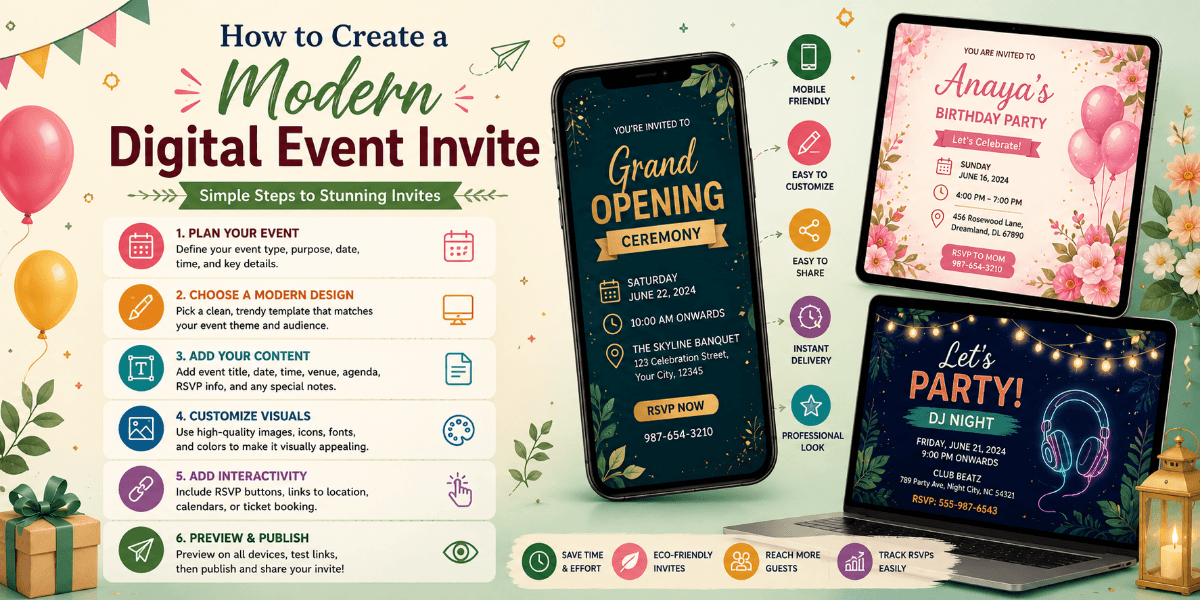
How to Create a Modern Digital Event Invite
Modern digital invitations are more than online versions of printed cards. They can combine visual design, event information, photographs, RSVP, location details, and other useful features into one guest experience.
Start With a Clean Layout
A modern invitation usually benefits from a simple structure. Give each section enough space and avoid filling every part of the screen with decorative elements.
Choose Two or Three Main Colors
A limited color palette can make the invitation feel more polished. Choose one primary color, one supporting color, and an accent color when needed.
Use Strong Typography
The event name should be visually prominent while supporting information remains easy to read. Create a clear hierarchy between headings, details, and smaller text.
Add One Strong Visual Element
A high-quality photograph, illustration, pattern, or decorative element can become the main visual focus. You do not need many graphics to create an attractive invitation.
Organize Event Information
Present information in a logical order so guests can quickly understand the celebration.
- Event name
- Host or organizer
- Date
- Time
- Venue
- Address
- RSVP or registration
Use Interactive Features Where They Help
Depending on the event, useful features can include RSVP, registration, countdowns, photo galleries, location information, event schedules, or guest management.
Design for Smartphones
Mobile-first design is especially important for digital invitations. Make buttons large enough to tap, keep text readable, and avoid layouts that require guests to zoom in.
Connect the Invite With Relevant Event Pages
If you publish supporting content on your website, use natural internal links to relevant event pages.
For example, an article about modern wedding invitations can link to the wedding invitation page, while content about celebrations for children can link to the birthday invitation page.
Keep the Guest Journey Simple
Guests should know what to do after opening the invitation. If RSVP is required, make the response option easy to find. If location information is important, make it clearly visible.
Test Before Sharing
Review the invitation on different screen sizes and test all interactive elements. Check text, images, links, buttons, RSVP, and event information before publishing.
Final Thoughts
A modern digital event invite should be attractive without becoming complicated. Use a clean layout, readable typography, a focused color palette, useful visuals, clear event details, and mobile-friendly interactions.
The goal is to make the invitation both beautiful and genuinely useful for guests.
FAQ
What makes a digital event invite modern?
Clean layouts, strong typography, focused colors, quality visuals, mobile-friendly design, and useful interactive features can create a modern invitation.
How many colors should a digital invitation use?
A small palette of two or three complementary colors often creates a clean and professional appearance.
Should digital invitations be mobile-friendly?
Yes. Mobile-friendly design ensures guests can comfortably view event information and interact with RSVP or other features.
Can digital event invites include RSVP?
Yes. RSVP is one of the useful interactive features that can be included in a digital event invitation.